> Output Sample
> Overview
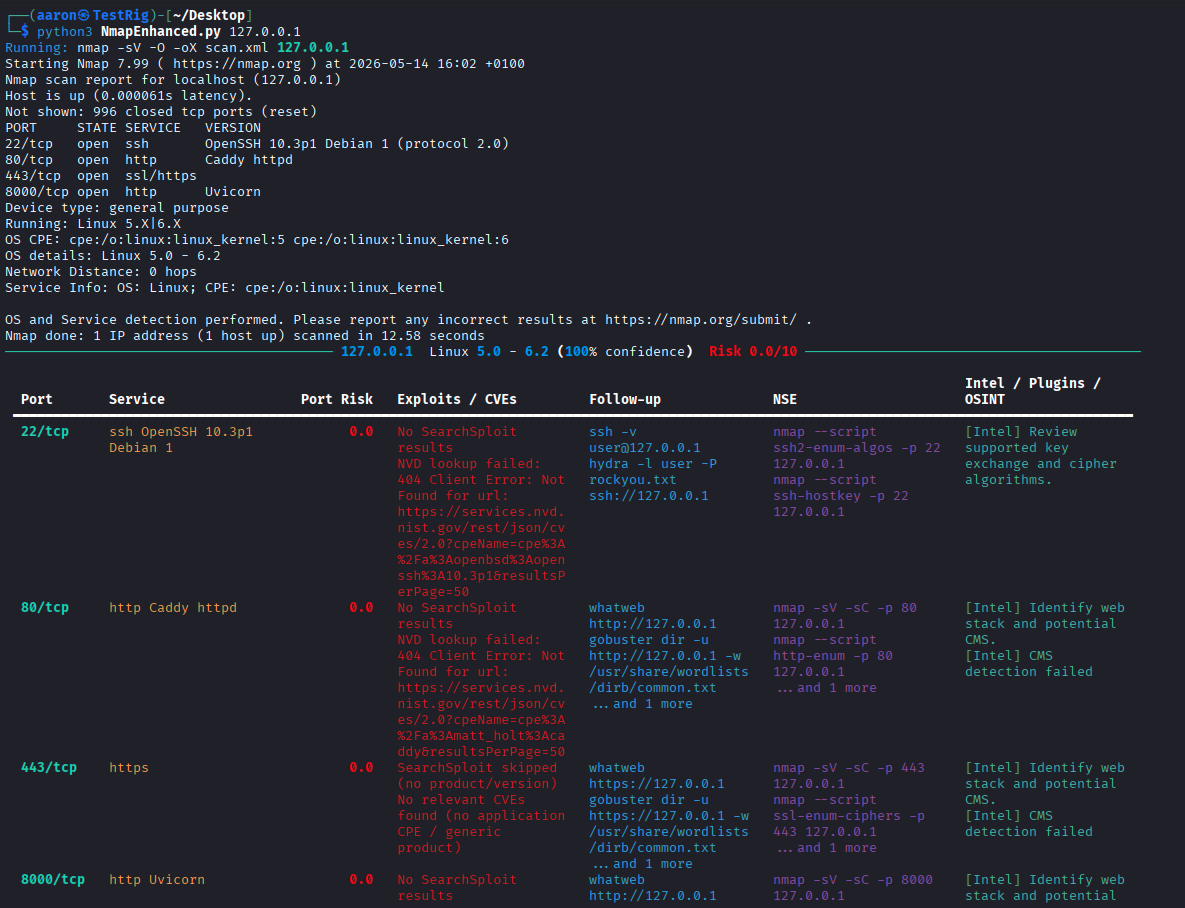
NmapEnhanced.py wraps a standard Nmap scan and automatically enriches every
discovered port with a structured intel table: risk score, known exploits and CVEs,
suggested follow-up commands, and relevant NSE scripts to run next. Instead of reading raw
scan output and manually looking up what each service means, you get a ready-made action
plan the moment the scan finishes.
> Example Run
$ python3 NmapEnhanced.py 127.0.0.1
Running: nmap -sV -O -oX scan.xml 127.0.0.1

PORT     STATE  SERVICE  VERSION
22/tcp   open   ssh      OpenSSH 10.3p1 Debian 1 (protocol 2.0)
80/tcp   open   http     Caddy httpd
443/tcp  open   ssl/https
8000/tcp open   http     Uvicorn

Nmap done: 1 IP address (1 host up) scanned in 12.58 seconds
> Enriched Intel Table
For every open port, the wrapper builds out a row covering risk, exploits/CVEs, and what to run next:
Port     Service              Risk   Follow-up                          NSE
22/tcp   OpenSSH 10.3p1        0.0    ssh -v, hydra -l user -P           nmap --script ssh2-enum-algos
                                      rockyou.txt                       nmap --script ssh-hostkey
80/tcp   Caddy httpd           0.0    whatweb, gobuster dir -w           nmap --script http-enum
                                      common.txt
443/tcp  https                0.0    whatweb, gobuster dir -w           nmap --script ssl-enum-ciphers
                                      common.txt
Each row also carries an "Intel / Plugins / OSINT" note, for example flagging that a service's key exchange algorithms should be reviewed, or that a web port's CMS should be identified, pulled from SearchSploit and NVD lookups where a match exists.
> Features
- Automatic per-port risk scoring
- CVE and exploit lookups via SearchSploit and the NVD API
- Suggested follow-up commands (Hydra, Gobuster, WhatWeb, and more)
- Relevant NSE script suggestions per service
- Structured output that feeds directly into other tools, including the
AI Pentest Agent
> Why I Built This
A raw Nmap scan tells you what's open. It doesn't tell you what to do next. I built this wrapper to close that gap: run one command and get both the scan and the "here's what I'd try next" reasoning that normally takes a few minutes of manual lookups per service.